PlanHub continues to evolve its platform with suppliers in mind—making it easier than ever to find the right projects and collaborate with your team. In this quick tutorial, suppliers are introduced to two powerful features: Multiple Keyword Search and Collaboration Tools. These innovations are designed to save time, streamline workflows, and help users maximize their experience on PlanHub.
Multiple Keyword Search
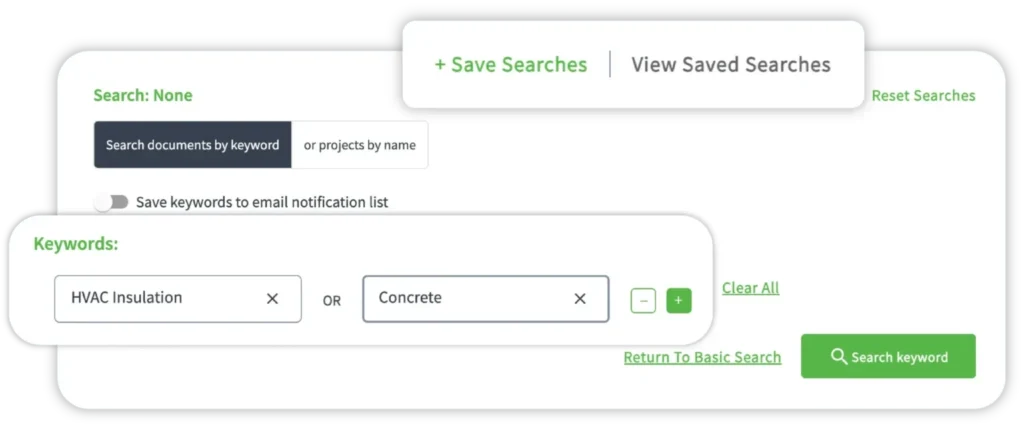
- Search multiple keywords at once — like 'wood panels,' 'ceramic tiles,' and 'steel beams' — so you can surface every relevant project opportunity in a single consolidated view instead of running separate searches one by one.
- Use the built-in File Viewer with automatic keyword highlighting to zero in on the details that matter most, without wasting time manually scrolling through lengthy project documentation.
- Save your favorite keyword combinations and filters so you can recall them with one click, stay consistent in how you track opportunities, and never lose momentum in your project pipeline.
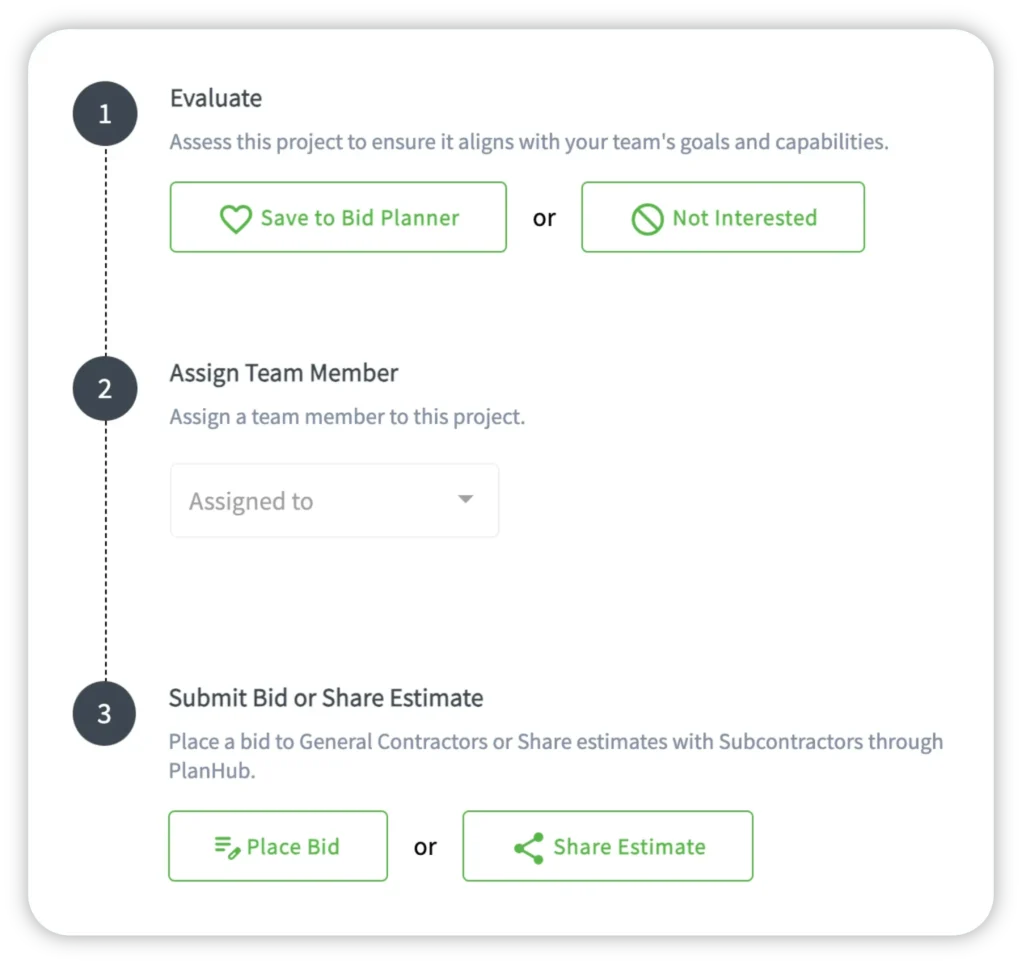
- Assign projects to the right team members, add notes, and trigger real-time notifications directly inside PlanHub — so your entire team stays aligned and accountable without relying on outside communication tools.
- With Multiple Keyword Search and Collaboration Tools now live on PlanHub, log in today to start working faster, reducing missed opportunities, and keeping your team focused on the projects that matter most.
Searching for the right projects just got more powerful.
With PlanHub’s new Multiple Keyword Search, suppliers no longer need to run multiple searches one term at a time. Instead, users can enter a range of keywords—such as wood panels, ceramic tiles, or steel beams—all at once. PlanHub will instantly display all matching opportunities in a single, consolidated view.
Once results populate, users can click into any project and explore detailed files within the built-in File Viewer. Every keyword entered is automatically highlighted across the documentation, helping users zero in on relevant information faster—without the hassle of manual scrolling.
Even better, suppliers can save their favorite keyword combinations and filters. With a single click, saved search settings can be recalled—allowing users to quickly revisit past results and maintain consistency in their project tracking.
Collaboration Tools
Strong teamwork drives project success—and PlanHub’s new Collaboration Tools make it easier than ever to keep everyone aligned.
Suppliers can now assign team members to specific projects, include relevant notes, and trigger real-time notifications. Whether delegating a new bid opportunity or updating a teammate on project progress, communication happens efficiently within the platform.
These built-in tools allow teams to share insights, manage responsibilities, and monitor progress—all in one place. Users can provide instructions, assign ownership, and ensure no task falls through the cracks, enhancing transparency and accountability across every project stage.
Unlock More with PlanHub
With Multiple Keyword Search and Collaboration Tools, suppliers can work smarter, faster, and more efficiently. These new features are now live and available within the PlanHub platform.
Discover how PlanHub helps suppliers stay ahead of the curve—try these tools today and experience a new level of productivity.